

Basal cell carcinoma (BCC) is the most common form of skin cancer diagnosed in the UK, but the abbreviation BCC also appears in a very different context: email communication. In email, BCC stands for “Blind Carbon Copy,” a field that lets you send a message to multiple recipients without revealing their addresses to one another. Understanding both meanings matters. If you have received a letter or email about a BCC diagnosis, or if you manage sensitive health communications, knowing how the BCC email field works helps you share information discreetly, protect patient privacy, and avoid common pitfalls in group correspondence.
What does BCC mean in email?
BCC, or Blind Carbon Copy, is an email field that delivers your message to additional recipients while keeping their identities hidden from everyone else on the thread. Only the sender can see who was BCC’d. Recipients in the To and CC fields have no way of knowing a BCC address was included.
The term “carbon copy” is a legacy reference to physical carbon paper, once used to produce duplicate documents. The “blind” element simply means the copy is invisible to others. Modern email clients including Gmail, Microsoft Outlook, and Apple Mail all support the BCC field natively.

BCC is not a niche feature. It is used daily in professional settings to protect privacy, manage mass correspondence, and prevent unwanted reply-all chains. For anyone managing health-related communications, such as sharing appointment details with a group of family members, BCC is the correct tool.
How does BCC differ from CC and To fields in emails?
The three recipient fields in any email serve distinct purposes, and confusing them creates real problems.
The To field is for the primary recipient. This person is the intended audience of the message. Everyone else on the thread can see who is in the To field.
The CC (Carbon Copy) field is for secondary recipients who need to be kept informed but are not the main addressee. All recipients, including those in the To field, can see every CC address. BCC promotes privacy whereas CC promotes transparency, and that distinction defines when each field is appropriate.
The BCC field hides its recipients from everyone. A person placed in BCC receives the full message but remains invisible to all other recipients.
To vs CC vs BCC: a direct comparison
| Field | Who sees it | Recipient can reply all | Best used for |
|---|---|---|---|
| To | All recipients | Yes | Primary addressee |
| CC | All recipients | Yes | Visible secondary recipients |
| BCC | Sender only | Yes, but reveals themselves | Private or mass recipients |
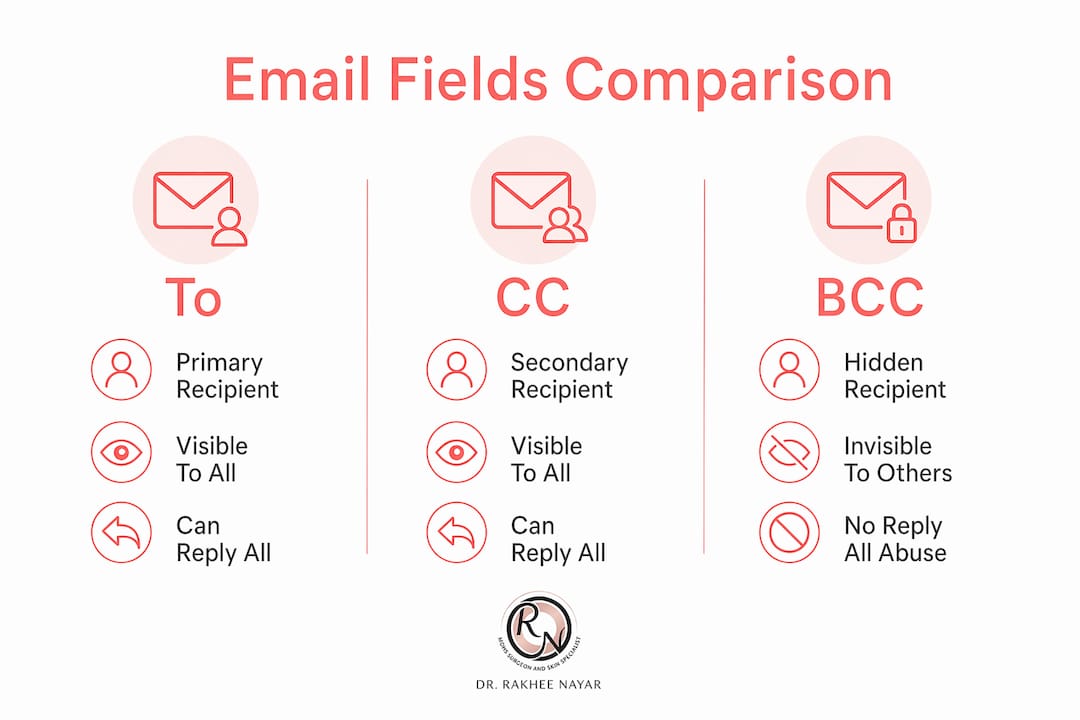
The reply-all risk in the BCC column deserves attention. A BCC recipient who clicks “Reply All” will expose their own address to everyone in the To and CC fields. This is one of the most common and damaging errors in group email management.
Key distinctions to remember:
- CC creates a visible paper trail shared by all recipients.
- BCC creates a private copy that the sender controls.
- Overusing CC in sensitive communications exposes addresses unnecessarily.
- BCC is the correct choice when recipients do not know each other or have not consented to share their contact details.
BCC reduces clutter and prevents reply-all email storms common in large group emailing. That practical benefit alone makes it the preferred field for newsletters, appointment reminders, and any correspondence sent to a list of unrelated individuals.
When should you use BCC in professional and personal emails?
BCC is the right choice in several clear situations. Industry guidance advises using BCC for groups of more than 10 unfamiliar recipients to protect privacy and prevent reply-all storms. That threshold is a useful rule of thumb, but the principle applies at any scale when recipients do not know one another.
Situations where BCC is appropriate
- Mass correspondence: Sending a newsletter, appointment reminder, or group update to people who have not consented to share their addresses with each other.
- Client communications: Copying a colleague on a client email without alerting the client to internal oversight.
- Sensitive personal emails: Notifying family members about a health matter where not everyone knows each other.
- Introductory emails: When introducing yourself to a list of contacts who should not see each other’s details.
- Forwarding with discretion: Sharing information with a third party without alerting the original sender.
Risks of misusing BCC
Overuse or misuse of BCC can damage professional relationships and trust. If a recipient discovers they were BCC’d on a message about them, or that their correspondence was shared without their knowledge, the consequences for professional credibility can be significant. BCC is not a tool for surveillance or covert monitoring of colleagues.
Pro Tip: When sending a mass email using BCC, place your own address in the To field. This prevents the message appearing to come from a blank sender, improves deliverability, and reduces the risk of spam filters rejecting the email.
Including the sender’s own email in the To field improves delivery and avoids blank recipient issues. This small step makes a measurable difference in whether your message reaches its intended audience.
BCC is also appropriate when you want a written record of a communication without creating an expectation that the BCC recipient will respond. A manager copying HR on a performance-related email is a common and legitimate example.
What are the limitations and common misconceptions about BCC?
BCC is widely misunderstood as a privacy or security feature. It is neither. BCC does not encrypt email content, and messages sent via BCC can still be forwarded, exposing both the content and any visible addresses.
What BCC does not do
| Misconception | Reality | Precaution |
|---|---|---|
| BCC hides message content | Only recipient addresses are hidden | Use encrypted email for sensitive content |
| BCC recipients cannot be identified | They can reveal themselves by replying all | Warn BCC recipients not to reply all |
| BCC prevents forwarding | Anyone can forward the email | Do not include confidential content in BCC emails |
| BCC is anonymous | The sender’s address is always visible | Assume the message can be shared |
| BCC is a substitute for secure channels | It is not; it is a routing tool only | Use dedicated secure platforms for sensitive data |
BCC does not inherently secure email content against external exposure. Secure communications require encryption beyond BCC functions. For genuinely confidential information, particularly in healthcare or legal contexts, encrypted messaging platforms or HIPAA and GDPR-compliant systems are the appropriate choice.
A second common misconception is that BCC recipients are unaware of their status. In fact, BCC recipients can see that they received a blind copy. What they cannot see is who else was BCC’d. They also cannot see the full list of To and CC recipients unless that information is visible in the message body.
Pro Tip: Before sending any BCC email containing sensitive information, ask yourself whether you would be comfortable if the full message were forwarded publicly. If not, BCC is not the right tool.
Awareness of how reply behaviours affect BCC privacy is crucial. Recipients must be warned not to use “Reply All” to maintain confidentiality. A single accidental reply-all from a BCC recipient can expose the entire list.
How to use BCC effectively and ethically in email communication?
Effective BCC use follows a clear process and a consistent set of principles. The steps below apply to most major email clients including Gmail, Microsoft Outlook, and Apple Mail.
Adding BCC recipients: a step-by-step process
- Open a new email composition window.
- In Gmail, click “More options” or the BCC link next to the CC field. In Outlook, select “BCC” from the Options tab. In Apple Mail, go to View and select “BCC Address Field.”
- Type or paste the addresses of your BCC recipients into the BCC field.
- Place your own address or a relevant primary contact in the To field.
- Complete the subject line and message body as normal.
- Review the recipient fields before sending to confirm no address is in the wrong field.
- Send the message.
Do’s and don’ts for BCC etiquette
Do:
- Use BCC for mass emails to protect recipient privacy.
- Inform BCC recipients when their inclusion is relevant to them, for example by noting in the message that they have been copied for their records.
- Use BCC when recipients have not consented to share their contact details with each other.
- Keep a record of who was BCC’d for your own reference.
Don’t:
- Use BCC to secretly monitor colleagues or clients without their knowledge.
- Assume BCC protects the content of your message.
- BCC someone on a message that contains information about them without their knowledge.
- Rely on BCC as a substitute for a proper mailing list management tool when sending large volumes of email.
Effective use of BCC involves understanding potential trust issues and using it only where necessary to protect privacy without alienating recipients. Transparency about your communication practices builds trust. When in doubt, consider whether a direct email or a properly managed mailing list would serve the situation better.
For organisations sending regular group communications, dedicated email marketing platforms offer more control, better deliverability, and clearer consent management than BCC in a standard email client.
Key takeaways
BCC (Blind Carbon Copy) protects recipient privacy in group emails, but it is not a security feature and must be used with clear intent and ethical judgement.
| Point | Details |
|---|---|
| BCC hides recipient addresses | Only the sender sees who was BCC’d; To and CC recipients cannot see BCC addresses. |
| BCC is not a security tool | Message content remains unencrypted and can be forwarded by any recipient. |
| Reply-all risk is real | A BCC recipient who clicks “Reply All” exposes their address to all other recipients. |
| Use BCC for groups over 10 | Industry guidance recommends BCC when emailing more than 10 unfamiliar recipients. |
| Ethical use builds trust | Misusing BCC for covert monitoring damages professional relationships and credibility. |
A note on privacy, transparency, and when to choose openness
Miss Rakhee Nayar shares her perspective:
I have spent years working in a field where communication about sensitive diagnoses must be handled with care. That experience has given me a clear view of where BCC helps and where it creates problems.
The most common mistake I see is treating BCC as a catch-all privacy solution. Patients and colleagues sometimes assume that because an address is hidden, the communication itself is protected. It is not. A forwarded email carries everything with it. If the content is genuinely sensitive, BCC is not enough.
What BCC does well is protect the dignity of recipients in group correspondence. When I think about how a patient might feel receiving an email that exposes the contact details of dozens of other patients, the case for BCC becomes obvious. That kind of careless CC use is not just poor etiquette. In a healthcare context, it can constitute a data breach.
My honest view is that openness is usually preferable to secrecy in professional communication. If you are using BCC because you would rather a recipient did not know about the others, ask yourself whether that discomfort signals a problem with the communication itself. BCC used to protect privacy is sound practice. BCC used to avoid a difficult conversation is not.
The best approach combines BCC with clear communication: tell people when they have been copied for their records, and explain why. That transparency costs nothing and builds the kind of trust that makes professional relationships durable.
— Miss Rakhee Nayar
Specialist skin cancer care from Miss Rakhee Nayar
If you arrived here searching for information about basal cell carcinoma, the skin cancer also known as BCC, the resources below are written specifically for you.

Rakhee Nayar – Mohs Surgeon and Skin Specialist offers specialist-led diagnosis, surgical treatment, and facial reconstruction for patients with basal cell carcinoma across the UK. Miss Nayar is a GMC-registered Consultant Plastic Surgeon, FRCS (Plast), dual-trained in both Mohs micrographic surgery and plastic surgery. You can read a detailed overview of Mohs surgery for BCC or explore the full Mohs micrographic surgery service to understand what treatment involves. Private consultations and e-consultations are available. This article does not constitute medical advice. Consult a GMC-registered specialist for guidance specific to your situation.
FAQ
What does BCC stand for in an email?
BCC stands for “Blind Carbon Copy.” It is an email field that delivers your message to additional recipients without revealing their addresses to anyone else on the thread.
Can BCC recipients see each other?
No. BCC recipients cannot see who else was included in the BCC field. They can see the To and CC recipients, but not other BCC addresses.
Is BCC safe for sending confidential information?
BCC is not a security feature. Message content is not encrypted and can be forwarded by any recipient. Use an encrypted communication platform for genuinely confidential information.
What happens if a BCC recipient clicks “Reply All”?
A BCC recipient who uses “Reply All” reveals their own address to all To and CC recipients, removing the privacy advantage of BCC entirely.
When is it appropriate to use BCC instead of CC?
BCC is appropriate when emailing groups of people who do not know each other, when recipients have not consented to share their contact details, or when you need a private record of a communication. CC is appropriate when all recipients should be aware of each other and can see the full correspondence.